1. Basics of Cloud Computing
What is Cloud Computing?
Cloud computing is the delivery of computing services over the internet ("the cloud") instead of using your own physical servers or computers 23. These services include servers, storage, databases, networking, software, and more 2. With cloud computing, you only pay for what you use, making it cost-effective for many businesses 34.
Types of Cloud Deployment Models
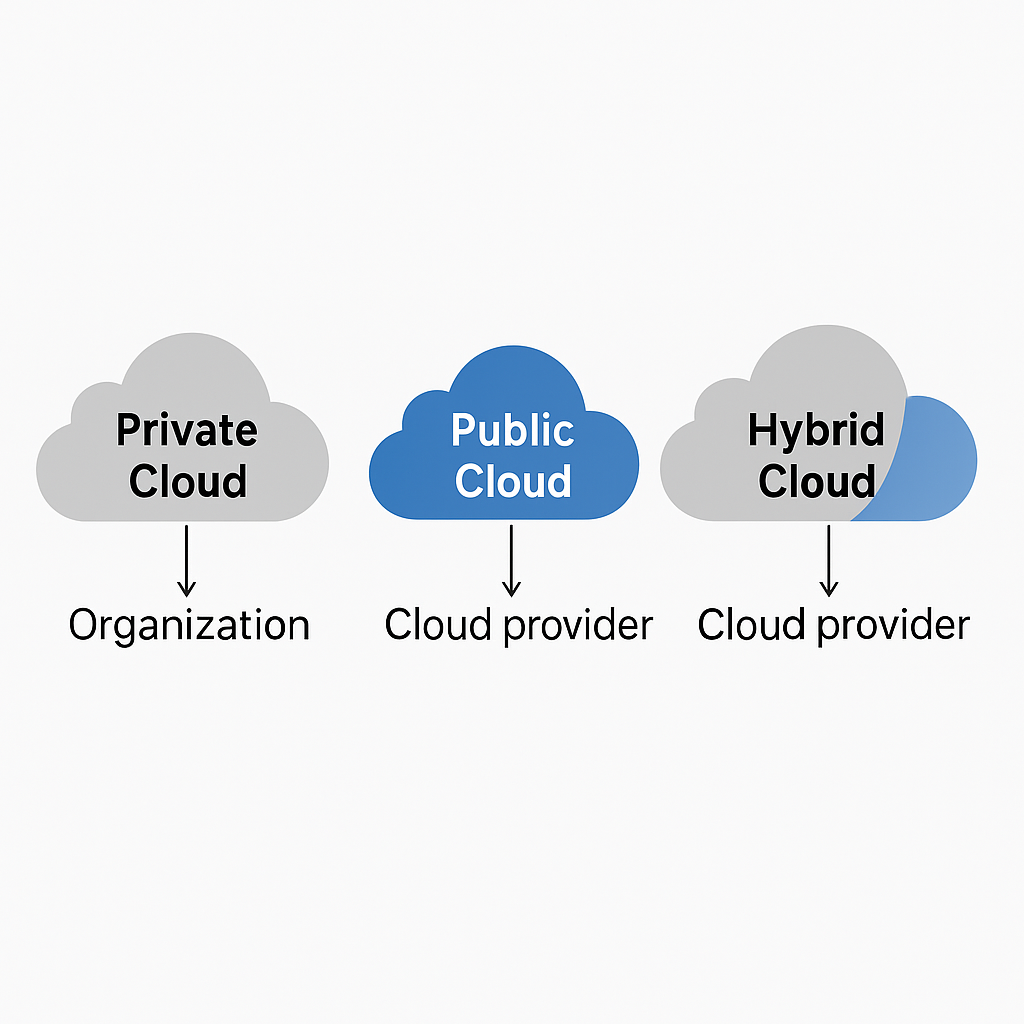
Private Cloud
Private cloud is used by only one organization 6. The infrastructure might be located on-premises or hosted by a third-party provider, but the services and infrastructure are always maintained on a private network 47. This provides greater control and security but costs more to maintain 6.
Public Cloud
Public cloud is owned and operated by third-party cloud service providers who deliver their computing resources over the internet 3. Examples include Microsoft Azure, AWS, and Google Cloud 7. It's generally less expensive and more scalable, but offers less control over data and security 67.
Hybrid Cloud
Hybrid cloud combines public and private clouds, allowing data and applications to be shared between them 67. This provides more flexibility, helping organizations optimize their existing infrastructure while still benefiting from cloud services 37.
Types of Cloud Services

IaaS - Infrastructure as a Service
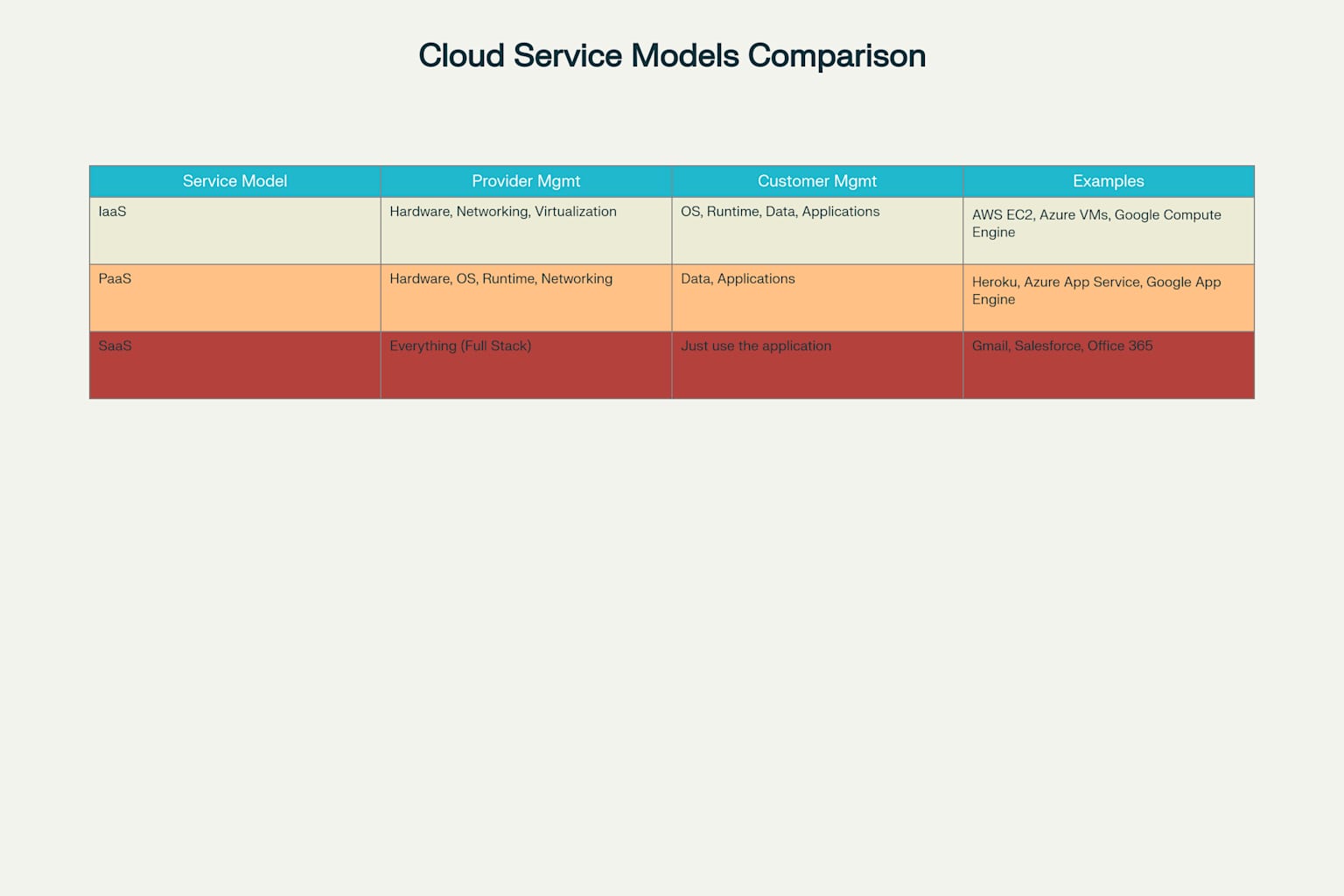
IaaS provides virtualized computing resources over the internet 10. The cloud provider manages the physical hardware, while you manage the operating system, applications, and data 1113. Examples include Azure Virtual Machines, AWS EC2, and Google Compute Engine 1316.
PaaS - Platform as a Service
PaaS provides the hardware AND software tools needed to develop and deploy applications 11. Developers can focus on creating apps without worrying about infrastructure, operating systems, or software updates 1012. Examples include Azure App Service, Google App Engine, and Heroku 12.
SaaS - Software as a Service
SaaS delivers fully functional applications over the internet that you can access through a web browser 1011. The provider manages everything, including the application, data, runtime, middleware, and operating systems 13. Examples include Microsoft 365, Google Workspace, and Salesforce 1314.
2. Cloud Computing Platforms/Vendors
Microsoft Azure
Azure is Microsoft's cloud computing platform that offers over 600 services 1819. It provides computing, analytics, storage, and networking capabilities that help businesses build, deploy, and manage applications 1820. Azure supports many programming languages and frameworks, both Microsoft-specific and third-party 20.

AWS - Amazon Web Services
Microsoft Azure is a cloud platform launched in 2010 1819. It provides a wide range of services and solutions to help organizations meet business challenges 21. Azure allows you to build, run, and manage applications across multiple clouds and on-premises 1922.
Azure is flexible (can scale up or down as needed), open (supports almost any operating system, language, or tool), reliable (offers 99.95% availability), and economical (pay-as-you-go pricing) 2225.
4. Azure Portal Walkthrough
The Azure Portal is a web-based, unified console that lets you manage your Azure resources 2021. You can build, manage, and monitor everything from simple web apps to complex cloud deployments through this interface 21. The portal provides:
-
A dashboard view of your resources
-
Access controls for users and permissions
-
Monitoring and health services
-
Billing information
5. Overview of Azure Resources/Services
Compute Services
Blob Storage
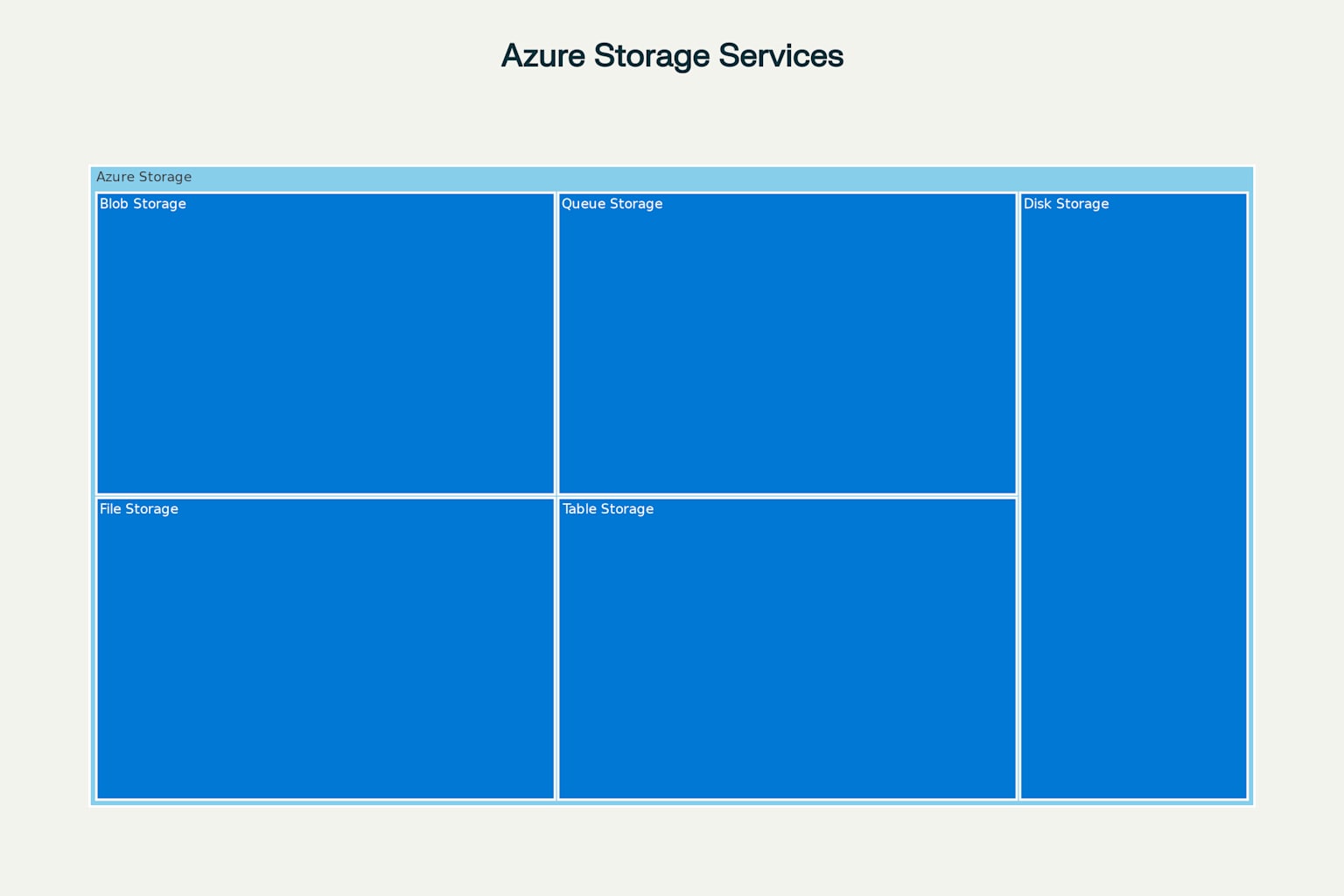
Blob Storage is designed for storing massive amounts of unstructured data like text, images, videos, and documents 2831. It's accessible via HTTP/HTTPS and is ideal for streaming content, storing backups, and serving files directly to browsers 2830.
File Storage
Azure Files provides fully managed file shares that can be accessed using standard protocols 2730. It's great for replacing traditional file servers and can be accessed from anywhere in the world 30.
Other Storage Types
Azure also offers Queue Storage (for messaging between application components), Table Storage (for NoSQL data), and Disk Storage (for virtual machine disks) 2730.
Data Services
What is Big Data?

Volume
Volume refers to the enormous amount of data generated every second from sources like social media, IoT devices, and business transactions 3336. This data is often measured in terabytes, petabytes, or even exabytes 3738.
Velocity
Velocity is about how fast data is being generated and processed 3638. Many sources produce data in real-time, requiring systems that can quickly collect and analyze this information 3739.
Variety
Variety describes the different types of data being collected 3739. This includes structured data (like databases), semi-structured data (like XML files), and unstructured data (like text, images, and videos) 3839.
Veracity
Veracity refers to the quality and accuracy of the data 3639. Because big data comes from many different sources, ensuring its trustworthiness is essential for generating reliable insights 3740.
Value
Value is about extracting useful insights from the data to help make better business decisions 3640. Without creating value, collecting all this data would be pointless 3940.
7. Overview of Azure Storage Accounts
Types of Storage Accounts
Azure storage provides different access tiers to help optimize costs 2730:
-
Hot tier: For frequently accessed data
-
Cool tier: For data accessed less often (at least 30 days)
-
Cold tier: For rarely accessed data (at least 90 days)
-
Archive tier: For data that can be offline (at least 180 days) 30
Data Replication
Azure offers several redundancy options to ensure data durability 2630:
-
Locally redundant storage (LRS): Copies data three times within a single data center
-
Zone-redundant storage (ZRS): Copies data across three Azure availability zones
-
Geo-redundant storage (GRS): Copies data to a secondary region
-
Geo-zone-redundant storage (GZRS): Combines ZRS and GRS approaches 2627
8. Azure Key Vault

Key Features
-
Centralized secret management: Store API keys, passwords, and certificates securely in one place 2932
-
Access control: Define who can access specific secrets and what they can do with them 32
-
Monitoring: Track who accessed secrets and when 29
-
Integration: Works seamlessly with other Azure services 2932
Security Benefits
Key Vault helps organizations:
-
Reduce the risk of security breaches by eliminating the need to store security information in applications 29
-
Control access to keys and secrets using Azure's identity management 32
-
Simplify certificate management and renewal processes 32
-
Meet compliance requirements for sensitive data handling 29
Azure Key Vault uses hardware security modules (HSMs) to provide an extra layer of protection for the most sensitive data 2932.
Citations:
- https://pplx-res.cloudinary.com/image/private/user_uploads/31195055/523c7ac2-0d3b-4b15-924d-6a2b43855ac7/image.jpg
- https://azure.microsoft.com/en-us/resources/cloud-computing-dictionary/what-is-cloud-computing
- https://cloud.google.com/learn/what-is-cloud-computing
- https://cic.gsa.gov/basics/cloud-basics
- https://www.spiceworks.com/tech/cloud/articles/what-is-cloud-computing/
- https://www.cantech.in/blog/cloud-deployment-models/
- https://www.aztechit.co.uk/blog/private-public-hybrid-cloud-difference
- https://www.lucidchart.com/blog/cloud-computing-basics
- https://www.simform.com/blog/cloud-deployment-models/
- https://www.ibm.com/think/topics/iaas-paas-saas
- https://cloud.google.com/learn/paas-vs-iaas-vs-saas
- https://www.ovhcloud.com/en-in/learn/iaas-paas-saas/
- https://www.bmc.com/blogs/saas-vs-paas-vs-iaas-whats-the-difference-and-how-to-choose/
- https://www.paddle.com/resources/saas-vs-paas-vs-iaas
- https://www.stackscale.com/blog/cloud-service-models/
- https://cloud.google.com/learn/what-is-iaas
- https://www.shiksha.com/online-courses/articles/difference-between-iaas-paas-and-saas/
- https://www.simplilearn.com/tutorials/azure-tutorial/what-is-azure
- https://azure.microsoft.com/en-us/resources/cloud-computing-dictionary/what-is-azure
- https://en.wikipedia.org/wiki/Microsoft_Azure
- https://www.techtarget.com/searchcloudcomputing/definition/Windows-Azure
- https://www.unitrends.com/blog/what-is-microsoft-azure-and-how-does-it-work/
- https://www.youtube.com/watch?v=YfZ0zk5Zzcw
- https://www.youtube.com/watch?v=oPSHs71mTVU
- https://ccbtechnology.com/what-microsoft-azure-is-and-why-it-matters/
- https://learn.microsoft.com/en-us/azure/storage/common/storage-account-overview
- https://www.msp360.com/resources/blog/microsoft-azure-storage-types-explained/
- https://www.enterprisestorageforum.com/software/what-is-blob-storage/
- https://www.techtarget.com/searchwindowsserver/definition/Microsoft-Azure-Key-Vault
- https://tutorialsdojo.com/azure-storage-overview/
- https://www.logicmonitor.com/blog/what-is-azure-blob
- https://learn.microsoft.com/en-us/azure/key-vault/general/basic-concepts
- https://www.ibm.com/think/topics/big-data
- https://bmsce.ac.in/Content/IS/Big_Data_Analytics_-_Unit_1.pdf
- https://www.sap.com/sea/products/technology-platform/what-is-big-data.html
- https://www.teradata.com/glossary/what-are-the-5-v-s-of-big-data
- https://www.bigdataframework.org/the-four-vs-of-big-data/
- https://en.wikipedia.org/wiki/Big_data
- https://www.analytixlabs.co.in/blog/characteristics-of-big-data/
- https://bernardmarr.com/what-are-the-4-vs-of-big-data/
- https://aws.amazon.com/what-is-cloud-computing/
- https://docs.aws.amazon.com/whitepapers/latest/public-sector-cloud-transformation/selecting-the-right-cloud-for-workloads-differences-between-public-private-and-hybrid.html
- https://www.techtarget.com/whatis/feature/SaaS-vs-IaaS-vs-PaaS-Differences-Pros-Cons-and-Examples
- https://www.spiceworks.com/tech/cloud/articles/paas-vs-iaas/
- https://azure.microsoft.com/en-us/get-started
- https://learn.microsoft.com/en-us/training/paths/microsoft-azure-fundamentals-describe-cloud-concepts/
- https://learn.microsoft.com/en-us/azure/storage/common/storage-introduction
- https://turbo360.com/guide/azure-storage-account
- https://k21academy.com/microsoft-azure/admin/azure-storage-account/
- https://www.oracle.com/in/big-data/what-is-big-data/
- https://www.lpude.in/SLMs/Master%20of%20Computer%20Applications/Sem_2/DECAP456_INTRODUCTION_TO_BIG_DATA.pdf

Answer from Perplexity: pplx.ai/share
Comments
Post a Comment